
CodeJam

Design Thinking Process, Personal project
Approach/Project type
Adobe XD, Miro, Pen & paper
Tools
Duration
8 weeks
Role
User Research, Interaction, Visual Design, Prototyping & Testing
Problem
There is not a single platform for people to learn and practice coding and prepare for jobs. Students and young professionals find it difficult to learn and practice coding and improve their skills. The users find it difficult to understand what they are good at and what needs to be improved etc.
CodeJam is a platform for young audiences to learn and practice coding. This platform can also help you to find mentors and get jobs related to coding and software.
The reason I chose CodeJam because, in my college days, I use to do coding as my background is IT engineering I was aware of the problems students face while coding and learning. Students didn't have any guidance on how and from where to learn and most of the students had a hard time finding things which led to horrible campus placements.
Project overview
Solution
CodeJam provides a user-friendly interface where the users can learn and practice coding without any hassle to visit different sites, users can learn and practice based on topics, companies, difficulties, etc., they can choose a career path, mentors, and jobs as well.
Design Process
For user centered design process, I adopted the five stage Design Thinking model.

User Research
Empathize
For the user research, I did secondary and primary research to understand and anlyse the user needs, behaviour and pain points.
Secondary Research
In this research I checked bunch of survey reports and coding communities to know painpoints and demographics. here are few insights from the surveys.
-
A 2020 survey report from stack overflow shows that people who write code professionally and studied at the university level, over 62% have a degree in computer science, computer engineering, or software engineering. The report also shows that more than 40% of coders are from age group 16 - 27.
-
A 2018 survey report from techgig shows that 45% developers are self taught.
-
A 2018 survey report from freecodecamp shows that 58% learners who are not yet develovers plan to start applying for jobs in the next 12 months.
-
A 2019 survey from Hyperiondev shows that more that 60% of learners have taken online courses.


2020 Stack overflow survey
2019 Hyperiondev survey
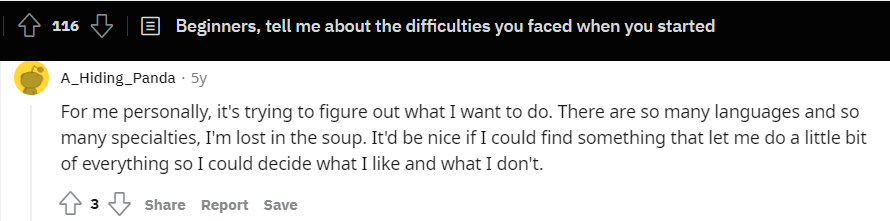
Below are some community dicussions I checked from reddit,quora and few blogs.



Primary Research
This part was carried out by conducting interview of 8 people in order to gain understanding of thoughs and painpoints, this also helped me understand what platforms doe the users use to learn, practice and prepare for coding placements or jobs.In this interview 5 participants were students and the 3 participants were professionals.
Here are a few of the insights from the interview.
-
All the participants had difficulty understanding their strong and weak topics.
-
All the participants said they want the contents organised.
-
All the participants want to stay consistent.
-
All the participants said they need guidance on prepartion.
-
7 of 8 participants said they want all the contents of prepartion in one platform.
-
7 of 8 partcipants said they need hint or help when they stuck at problems.
-
5 of 8 participants compete with their friends and discovered few platforms through their friends.
Competitive Audit
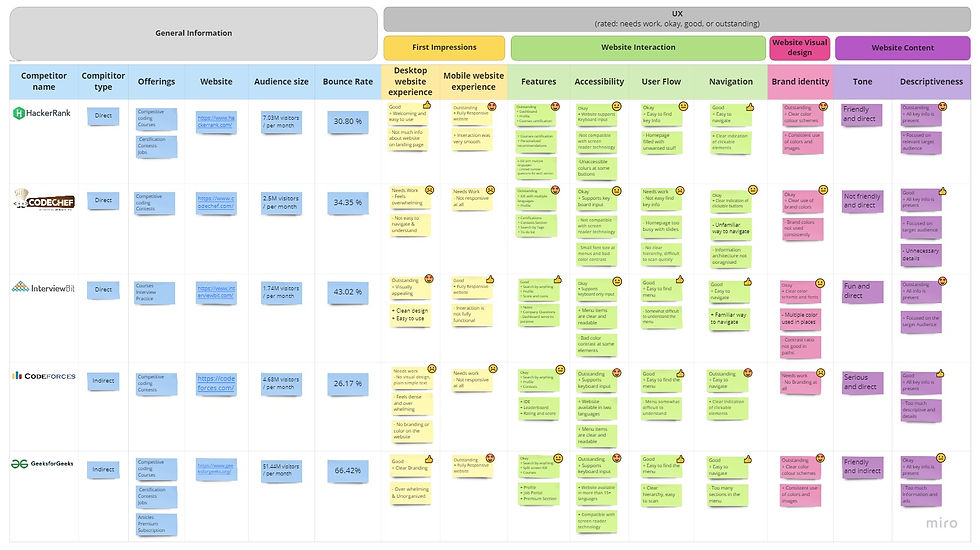
From the user research I discovered 3 direct and 2 indirect competitors, this helped me in understanding how the competitors are solving the problem and what are things they are doing well and what needs to be improved.

Define
Personas
After compiling and sythesizing the research findings from the emapthize phase next step is to create engaging personas. Here I created two personas for the two target groups, professionals and students to collate research and patterns in the data.


Problem statement
Defining the problem statement which is centered around targeted users needs.
Khusboo
-
Who: An intern
-
What: Khusboo wants to solve & practice coding problems for her interviews.
-
Where: Khusboo is likely using the platform at home.
-
When: Khusboo gets frustrated & confused when she is stuck while solving problems.
-
Why: Khusboo finds it time consuming and confusing to find solutions from different websites.
-
How: Khusboo wants to start solving problems and get help directly from there if she is stuck.
Pranab
-
Who: A student
-
What: Pranab wants to practice coding problems for his campus placements.
-
Where: Pranab is likely using the platform in his hostel/study room.
-
When: Pranab gets confused when starts browsing different coding courses and websites to practices.
-
Why: Pranab is a begginer and he doesn't know how and what to learn & practice.
-
How: Pranab wants a roadmap and guidance or mentor to prepare for his placements.


-
HMW help users know their strong and weak topics?
-
HMW help users reduce confusion in Codejam?
-
HMW help users choose a career path?
-
HMW help users find a mentor?
-
HMW help users solve more coding problems in codejam?
-
HMW help users get a job through codejam?
-
HMW help users stay consistent in our platform?
-
HMW help users solve problems and engage with their friends and community?
Ideate
HMW's

Crazy 8's
User flow

Information Architecture

Wireframes
Prototyping



Low Fidelity Prototype

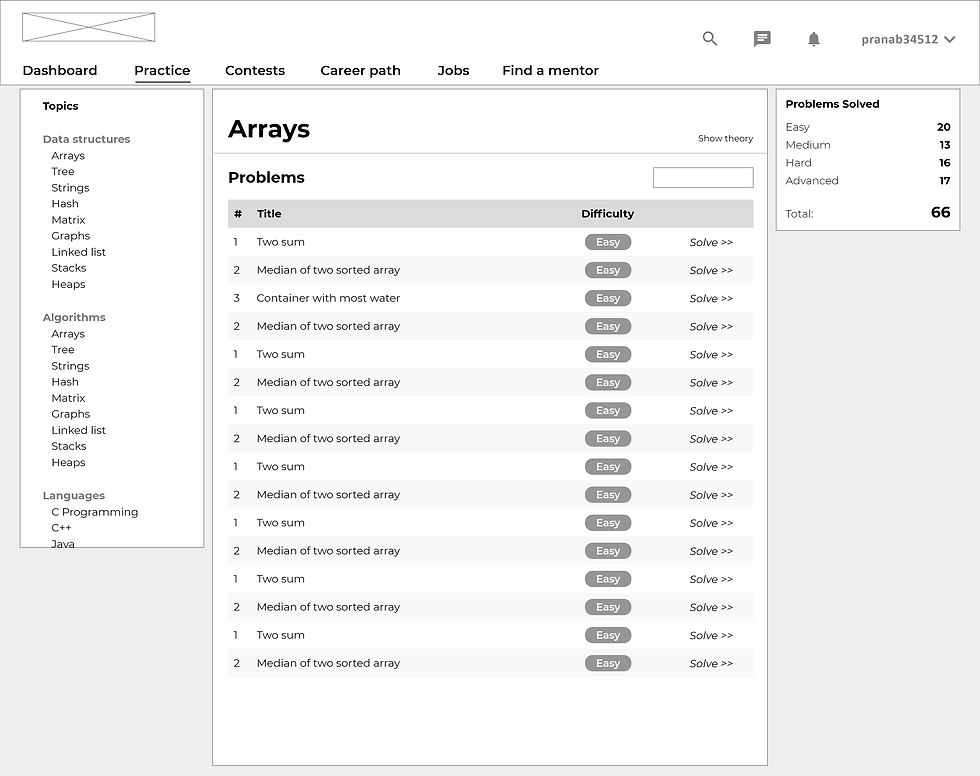
Created a basic low-fidelity prototype for usability testing.
Usability Testing
After creating the low fidelity prototype the next step was to test the functionality & usability of the design from the user's point of view. I did the usability testing with 5 participants by giving them prompts and by asking how difficult it was to follow up with each prompt and what can be improved and added.
Here are the insights I found after usability testing.
-
Change show theory and problems into tabs view in the practice page.
-
Add sorting arrows in all the tables
-
Add a custom input section in the IDE
-
Add a scroll-up button in the lengthy pages.

Test
Final Design

The dashboard shows the user's data, like points, problems solved, etc., It also helps the user know their level in the topics, their friend's points, active contests, and the current career path the user have taken.
Dashboard

Practice & IDE
The user can practice directly from the progress table or from the practice tab. In the IDE the user can run code, check hints, solutions, and their submissions.

The users can search a mentor by keyword like company name, role, etc., and can book a session, similarly, they can search for jobs and apply.
Mentorship & Jobs
Learnings
This project was a huge learning experience for me, starting with user research, it helped me improve my interview-taking process and understanding what kind of questions will help me uncover the pain points of the users and also helped me validate my assumptions. I also learned a lot about how analyzing competitors help me build a better user experience for the users. I also got to know about usability testing and how it impacts and helps to understand how the user will use the product and what problems they will face while using the product in the real world. I also got to know about design systems, how design system helps make the design consistent and save time in the product prototyping and development. Finally, I learned to add some micro-interactions to improve the product experience.
There are still a lot of things to add and improve. I will be doing few more usability tests in the high fidelity prototype and will be doing few iterations based on the observations and I have also planned to make CodeJam a responsive platform.
Next Steps
Thank you for your time reviewing my work on the CodeJam platform! If you’d like to see more or get in touch click on the icons below.